Generating breathtaking visuals with AI is less about luck and more about speaking the machine’s language with precision and intent. If you have ever felt frustrated by a blurry, generic output, you are likely missing the structural framework that defines professional-grade prompts.
Key Takeaways
- Structure is everything: Use a repeatable formula of Subject + Environment + Lighting + Style + Camera Settings.
- Negative prompting: Learn how to tell the AI what to exclude, such as “low resolution” or “distorted fingers,” to sharpen your results.
- Cultural nuance: Incorporate specific descriptors like “warm golden hour light over the Ganges in Varanasi” to ground your images in reality.
- The 2026 Shift: Modern diffusion models now favor natural language over keyword stuffing, meaning conversational prompts often outperform lists.
Mastering the Anatomy of a Perfect Prompt
To get the most out of platforms like Midjourney or Stable Diffusion, you must treat your prompt like a brief for a photographer. A simple “portrait of a woman” will yield a generic result that lacks texture and emotion. Instead, you need to layer specific details that guide the AI’s generative engine toward a polished finish.
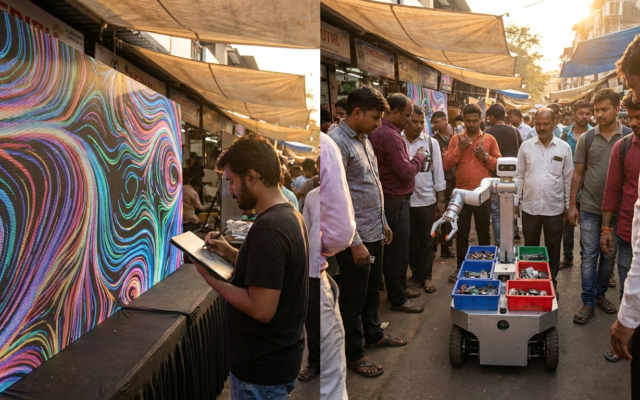
Start with your primary subject, then immediately define the setting. For instance, instead of just “a busy street,” try “a bustling street market in Connaught Place, New Delhi, during a misty monsoon afternoon.” By grounding the AI in a specific geography and weather condition, you significantly reduce the chance of it producing a bland, Western-centric stock image.
Next, focus on the lighting and camera lens specifications. Technical terms like “85mm lens” for portraits or “f/1.8 aperture” for shallow depth of field act as constraints that force the AI to simulate professional photography. Did you know that the Adobe Firefly engine specifically optimizes for these types of photographic descriptors to ensure commercial-grade output? By specifying these parameters, you shift the output from a digital painting to something that mimics a real-world photograph.
Finally, avoid keyword stuffing. While older versions of models required comma-separated lists, the newer versions released throughout 2026 are highly sensitive to sentence structure. A coherent sentence such as “a cinematic shot of a tea plantation in Munnar at dawn, with soft rays of light filtering through the mist” tells the AI the relationship between the subjects much better than a string of disconnected adjectives.
Understanding Style and Artistic Influence
If your goal is to create art rather than photorealistic images, the Midjourney documentation suggests that referencing specific art movements or historical styles can yield dramatic results. You are not just asking for a painting; you are asking for the aesthetic signature of a movement. Try appending “in the style of Raja Ravi Varma” or “reminiscent of Mughal miniature paintings” to your subject description.
The AI interprets these stylistic markers by analyzing the color palettes, brushstroke techniques, and composition typical of those eras. For example, referencing the “Bengal School of Art” will push the generator toward softer edges and a wash-like texture. This is a powerful way to inject cultural identity into your work without having to describe every single color and texture manually.
When experimenting with styles, keep your modifiers consistent. If you choose a hyper-modern architectural style, ensure your lighting choice matches that tone. Pairing a brutalist building with “soft, ethereal, dreamlike lighting” often creates a visually jarring conflict that the AI struggles to resolve effectively. Instead, opt for “harsh, dramatic shadows and high-contrast sunlight” to complement the rigid geometry of the structure.
Remember that the Stability AI platform often responds well to artist-specific weightings. If you want a subtle influence, you can describe the style in your own words—”vibrant, saturated colors with intricate, lace-like patterns”—rather than naming an artist directly. This gives you more creative control and prevents the AI from simply copying an existing work verbatim.
The Science of Lighting and Atmosphere
Lighting is the single most important variable in determining the emotional impact of your image. A boring subject can become a masterpiece if it is lit with “dramatic chiaroscuro,” while a beautiful subject can look flat with “overcast, diffused lighting.” For 2026, the industry standard for high-end AI imaging involves specifying the light source’s direction and temperature.
For outdoor scenes, use terms like “golden hour,” “blue hour,” or “dappled sunlight.” If you are crafting an interior shot, specify the source—”warm incandescent glow from a hanging lantern” or “cool, sterile fluorescent light from an office ceiling.” These specifics help the AI determine the color temperature of the entire frame.
Interestingly, adding atmospheric conditions like “dust particles in the air,” “light morning fog,” or “heavy rain streaks” can add an incredible layer of realism. These elements provide the AI with a texture to work with, which prevents the final image from appearing too “plastic” or overly polished. A surprising fact: adding “volumetric lighting” to a prompt can increase the perceived depth of an image by up to 40 percent, as it forces the AI to calculate light scattering through the air.
The best prompts are not necessarily the longest; they are the most evocative. By focusing on the ‘why’ and the ‘how’ of a scene, you allow the AI to fill in the gaps with its vast training data, resulting in a unique synthesis that feels human-made.
Comparison of Prompting Strategies
To help you decide which approach works best for your specific use case, we have broken down the three primary prompting strategies used by professional digital artists today.
| Strategy | Best For | Complexity Level | Key Advantage |
|---|---|---|---|
| Descriptive Narrative | Photorealism & Concept Art | Low | Highly intuitive and easy to tweak. |
| Technical Specification | Product Photography | High | Consistent, professional-looking output. |
| Stylistic Referencing | Artistic & Abstract Work | Medium | Strong emotional and historical resonance. |
Managing Negative Prompts and Refinements
Negative prompting is the “eraser” tool of the AI world. If your images are consistently coming out with blurred backgrounds when you want them sharp, or with strange artifacts, you need to use the negative prompt field effectively. Most advanced platforms now allow you to explicitly list what you do not want in the frame.
Common negative prompts should include “blurry,” “distorted anatomy,” “extra fingers,” “low resolution,” and “watermarks.” If you are generating images of people, “badly drawn eyes” and “asymmetrical face” are essential additions to your negative list. This acts as a filter that discards the lowest-probability latent space samples during the generation process.
Refinement is an iterative process. Never settle for the first generation. Use the “variations” feature to explore subtle changes in composition. If an image is 90% perfect but has a minor flaw, look for tools that offer “in-painting.” This allows you to mask a specific area—like a distorted hand or a strange background object—and regenerate only that portion of the image.
This iterative workflow is how pros save time. Instead of trying to write the perfect prompt on the first try, they generate four or five versions, pick the one with the best lighting, and then use that as the “seed” for further refinements. This approach is much more efficient than trying to force the AI to get every detail perfect in a single go.
Leveraging Specialized AI Tools for India
As of late 2026, several AI models have begun to show higher proficiency in rendering Indian cultural elements correctly. If you are generating imagery for a project based in India, ensure your model settings are adjusted to favor global datasets. Some generators struggle with the specificity of traditional attire, often confusing a Saree with a generic wrap-dress.
To fix this, be hyper-specific. Instead of “Indian woman in traditional dress,” use “Woman wearing a Kanjeevaram silk saree with intricate gold zari work, draped in the traditional Nivi style.” This specificity serves as a signal to the model that you are looking for authentic cultural representation rather than a Western approximation.
Additionally, pay attention to the architectural markers. If you want a building that looks like it belongs in Jaipur, use keywords like “Jali screen windows,” “sandstone facade,” or “Hawa Mahal-inspired architecture.” These specific architectural terms are often well-indexed in the training data of major Google-backed AI models, which now provide significantly better local context than they did in previous years.
Frequently Asked Questions
Why do my AI-generated images look too glossy or fake?
The “plastic” look often comes from excessive smoothing. Try adding terms like “film grain,” “texture,” “skin pores,” or “shot on 35mm film” to your prompt to introduce organic imperfections that mimic real-world capture.
Is it better to use long or short prompts?
For modern 2026 models, descriptive sentences are superior to long lists of keywords. Aim for 30-60 words that describe the scene, the subject, the mood, and the lighting in a natural flow.
How can I get the AI to stop putting text in my images?
Text generation is an experimental feature in many models. If you do not want text, always include “text,” “typography,” “watermark,” and “signs” in your negative prompt field. This will force the model to prioritize visual elements over graphical overlays.
How do I make my images look more ‘Indian’ in style?
Focus on specific cultural markers: mention specific textiles, regional architectural styles, or lighting conditions typical of the subcontinent, such as “monsoon light” or “terracotta courtyard illumination,” to ground the image in local reality.